
|
||
|
|
||
Upon executing the check from within SCIA Engineer, an export will be made of all relevant model data (cross-sections, materials, internal forces ...) into a so called 'DataCache'.
Each of those data has a specific ESA ID by which it can be identified within the Design Form.
Annex B gives an overview of the ESA ID's for the most basic data available in the 'DataCache'.
In this first step, the ESA ID's for the relevant variables which will be linked are defined in the Form.
Launch the Scia Design Forms Builder and open the Form Manual_Example_1.CLS.
Within this Form, the grid on the 'Calculation' tab shows the double values to be manually inputted in a green color:
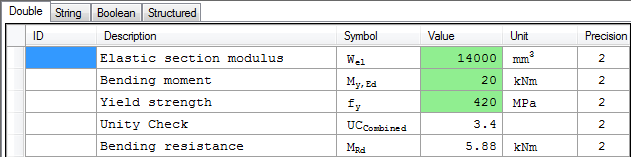
The first column labeled 'ID' will be used to set the respective ESA ID for these input variables.
Using the basic information from Annex B the following ID's are found to represent the data needed by the form:
|
ESA ID |
Variable |
|---|---|
|
CS.Chars.Wely |
Elastic section modulus about the principal y-axis |
|
InternalForces.My |
Bending moment about the principal y-axis |
|
Material.EC.fy |
Yield strength of the material for Eurocode EC-EN |
These ID's are inputted within the grid of the Form:
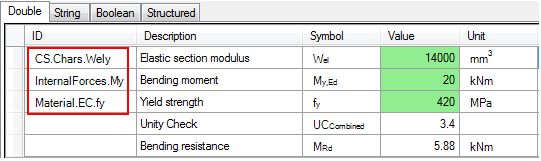
This concludes the first part of this step; all input variables for the Form are now properly linked to ESA.ID's.
In the same way as the input variables were linked also output variables are defined within the Form.
Output variables typically represent result values which the Form will send back to SCIA Engineer.
Output variables are defined using the ID Result.X where X represents a number from 1 to 'n'.
In this example there is one result value which will be defined, the Unity Check value UCCombined. This variable will thus be given the ID Result.1.
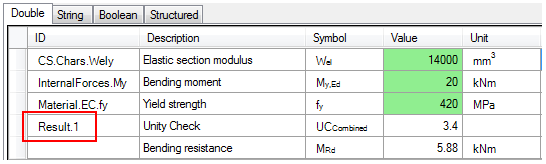
The first output variable, defined using the ID Result.1 is also the variable which will be used by SCIA Engineer during the AutoDesign process. When defining multiple output variables it is thus advised to set the 'overall' unity check as the first result value.
In order to let the Form take into account the ID's defined in this Step refresh the Form either by pressing the button  or the F5 key.
This concludes the definition of the in- and output variables.