Open topic with navigation

8.7 Configuring the firewall on server side
The licenses have to be exchanged between the server and the computer using SCIA Engineer. To allow this exchange, it can be possible that exceptions have to be added to the firewall on the server side.
You have to add these 4 exceptions:
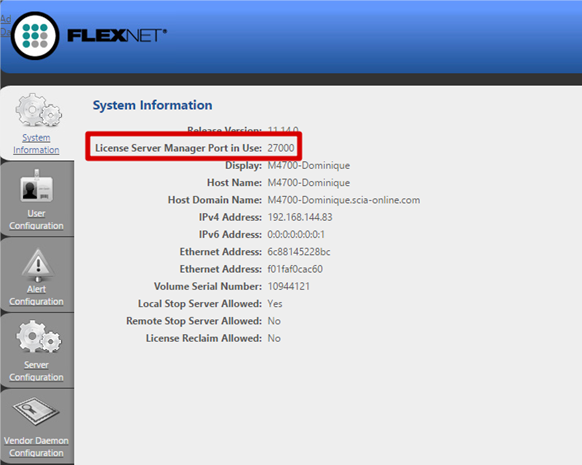
- The port used to send out licenses to the client pc (default is 27000).
You can check this port under
‘FlexNET License administrator > Administration > System Information’
- The port used to communicate with the server. This is the port used in step 1, plus 1.
So this is by default port 27001.
- Add the process “lmadmin.exe” as exception. This process is located in the following folder:
“C:\Program Files (x86)\Common Files\SCIA\LicenceServer\FlexnetServer”
- Add the process “SCIA.exe” as exception. This process is located in the following folder:
“C:\Program Files (x86)\Common Files\SCIA\LicenceServer\FlexnetServer\scia”
Open topic with navigation