
|
||
|
|
||
Checking of a connection may be carried out once two basic conditions are met:
the connection has been designed,
the project has been successfully calculated and results are available.
The checking results in a brief table containing the essential data about the connection, its resistance and the load it is subject to.
Open service Steel.
Open branch Connections.
Select function Check.
In the Property window, adjust the required checking parameters.
Use function Print > Print / Preview table to display the results in the Preview window.
|
Selection |
All – all beams are checked User – the user must select beams for the checking |
|
Type of load |
The checking may be carried out for load cases or for combinations. |
|
Load case |
Here the specific load case or combination may be selected. |
|
Filter |
Filter may be se to: No – there is no filtering Wildcard – the selection is given by the typed "wildcard expression", e.g. B*, BEAM1?, etc. |
|
Values |
Here the required quantity may be selected. |
|
Extreme |
This item tells which connections should be presented in the Preview Window (see below). |
|
No / Node |
All selected connections are checked and printed. |
|
Global |
All selected connections are checked, but only the one with extreme value is printed. |
The table with the results may look like:
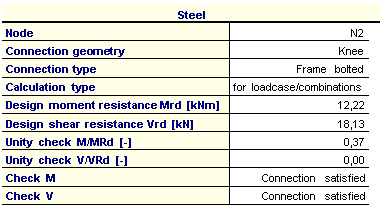
Note: Once the Preview Window is opened and the results of connection checking are displayed in it, any change of the checking parameters leads to the regeneration of the Preview Window. There is no need to use function Print > Print / Preview table over and over again.