
|
||
|
|
||
|
Use custom line width |
The user-defined line parameters (width) are used. |
|
No lines (cell and table borders) are printed at all. |
|
|
The default settings adjusted in the document setup are used. |
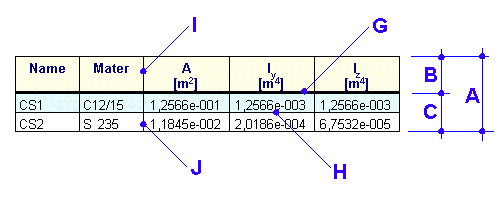
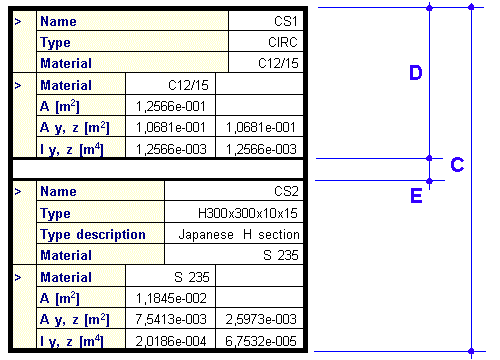
Some settings are relevant to horizontal tables, some to vertical tables and some to both. The explanation of the individual values is shown in the two pictures below.
|
Frame around table |
A |
|
Frame around header |
B |
|
Frame around body |
C |
|
Frame around section |
D |
|
Vertical space between sections |
E |
|
Frame around important cell |
F (not shown in the figures) |
|
Line under header |
G |
|
Line between rows |
H |
|
Line between columns in header |
I |
|
Line between columns in body |
J |
|
Use custom background colours |
The user may specify the colour of individual components of the table: header, odd row, even row, important cell (that a cell is important is defined by the author of the program and it cannot be changed by the user). |
|
Do not print any background |
No background is printed at all, just the lines (if defined) around the cells and around the table. |
|
Use document preset |
The default settings adjusted in the document setup are used. |
|
Table header |
Background colour of table header. |
|
Odd row |
Background colour of odd rows in the table. |
|
Even row |
Background colour of even rows in the table. |
|
Important cell |
Background colour of important cells (that a cell is important is defined by the author of the program and it cannot be changed by the user). |