|
||
|
|
||
The general procedure for the definition of a new load that extends over a span instead of the whole 1D member is the same as for normal beam-load. The only difference is that parameter Extent must be adjusted to span.
The same principle applies for all types of load on 1D member:
point load on 1D member,
line force on 1D member,
thermal load on 1D member,
moment load on 1D member,
line moment load on 1D member,
point displacement on 1D member – relative translation,
point displacement on 1D member – relative rotation,
line displacement on 1D member – longitudinal strain,
line displacement on 1D member – flexural strain.
The procedure will be explained for line force load on beam only. Examples will be given for several load types.
Open function Line force on beam via tree menu function Loads or via menu function Tree > Loads.
Specify the parameters of the load and its size.
Set parameter Extent to span.
Input the starting point and end point of the load position.
Confirm the settings with [OK] button.
Select 1D members where the load should act.
Close the function.
Example
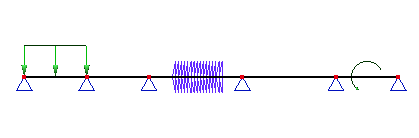
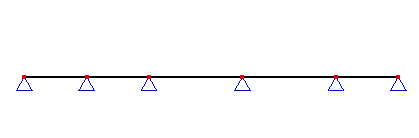
Let’s assume a continuous five span beam. Let’s assume that this beam is subject to three different loads:
line force load extending over the whole first span,
thermal load extending from the point in one fourth of the third span to the point in three fourths of the same span,
moment load acting in the middle of the last, i.e. fifth span.
The beam is shown in the picture below.
First, let’s define the line load over the first span. Call function Line force on beam and fill in the parameters according to the picture. REMEMBER to set the extent to span.
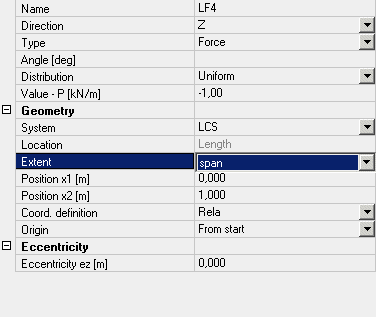
Confirm the settings and select the first span of the beam.
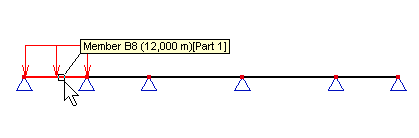
The load is inputted there.
Second, let’s add the thermal load. This load acts not along the whole span but only over its part. Call function Thermal load on beam. Fill in the table as shown below. Again, REMEMBER to set item extent to span.
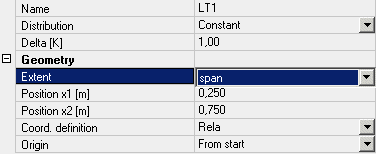
Confirm the settings and select the third span of the beam. The load is inputted accordingly.
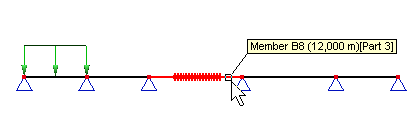
Finally, let’s input the moment load acting in the middle of the last span. Call function Moment > on beam and fill in the table as given below.
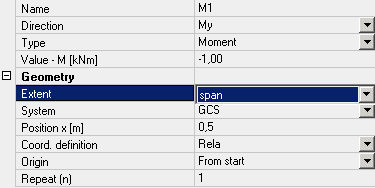
Confirm the settings and select the top right span of the beam. The moment is added to the beam.
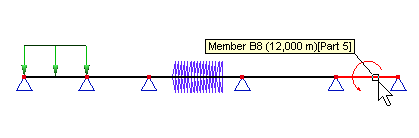
At the end, the beam is subject the three prescribed loads.