
|
||
|
|
||
The simplified ultimate limit state combinations are implemented according to: NEN 6702 art. 6.3.4.1.
The coefficients can be edited in Project data , Combinations tab page service menu.
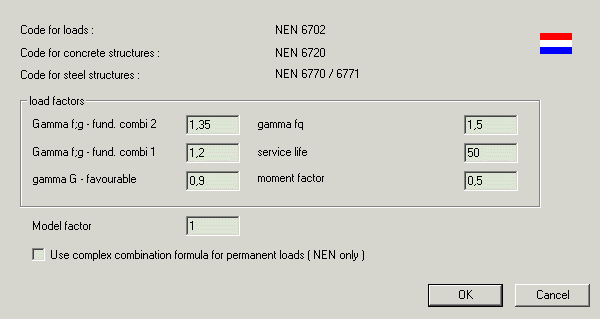
The following load types and coefficients are used.
|
Grep,i |
Permanent actions, e.g. self weight |
|
Qrep,i |
Variable actions, e.g. imposed loads on floors, snow loads, wind loads |
|
Gamma f;g |
Partial safety factors for permanent actions: 1.35 for unfavourable actions in permanent combinations (permanent actions only) (Gamma f;g - fund. combi 2) 1.2 for unfavourable actions in other combinations (Gamma f;g – fund. combi 1) 0.9 for favourable actions (Gamma G – favourable) See the notice at the end of this topic for the use of the 1.35, 1.2 and 0.9 coefficients. |
|
Gamma f;q |
Partial safety factor for variable actions : 1.2, 1.3 or 1.5 (Gamma fq) |
|
Momentaanfactor (Psii) |
This factor is entered for each group of variable load cases (NEN – mom. factor) Default value : 0.5. |
|
Service life (Psit) |
Factor to take the service life into account (Service life). Formula gives factor 1 for a service life of 50 years. According to NEN6720, art. 5.5.2. |
|
Model factor |
If a ponding water iteration is done the structure stiffness is divided by this model factor. Default value 1.3. |
|
Use complex combinations formula for permanent loads |
If switch ON, than each permanent load case is separately taken with the factor 1.2 and 0.9. Or with the factor 1.35 and 0.9 in combinations without variable loads. In the standard configuration of the program, the Gamma f;g coefficients for permanent load cases are taken 1.2 for all load cases (or 1.35 in combinations without variable loads) or 0.9 for all load cases. |
The following combinations are generated :

The load coefficient set in Project settings, combinations tab page are default settings. The value for momentaan factor can be changed for each load group in the service menu Load cases Combinations > Load groups.
If it is chosen to generate code combinations like NEN-Ultimate, than the coefficient entered in the Combination dialogue is multiplied with the coefficient which is generated by the program.
The following combinations are generated :

If it is chosen to generate code combinations like NEN-Ultimate, than the coefficient entered in the Combination dialogue is multiplied with the coefficient which is generated by the program.
The design effects of actions for the fire situation are taken from the results of the analysis. It is recommended to use the special combination rules according to NEN6702 6.3.4.2., for calculating the internal forces used in the fire resistance check.
This special combination is given by

in which Arep represents the characteristic value of the special load (from e.g. fire exposure).