
Displaying the foundation table
Service Reactions contains, among others, the possibility to generate a table with reactions in foundations.
This option is only available for load cases.
A coefficient may be entered for each load case. The reactions in the table are multiplied by this coefficient. This may be used with advantage to consider a safety factor in reactions.
The table generated in the Preview window contains in general four main parts:
|
Permanent loads |
All permanent load cases are considered together. Only the total reaction (sum of all permanent load cases) is given. |
|
Variable load case - not exclusive |
Variable load cases which are not in an exclusive group. They can act simultaneously with all other variable loads. |
|
Variable load cases - exclusive |
These load cases cannot act simultaneously with other load cases of the same exclusive group. |
|
Extremes |
This section contains extreme values composed from all permanent and variable load cases. |
The procedure for the generation of a foundation table
-
Select function Foundation table (just click the function, do not open it by double-clicking).
-
Adjust the parameters of the function (see below).
-
Use function Print / Preview data to create a table in the Preview window.
-
either use menu function File > Print data > Print / Preview data,
-
or use function Print data > Print / Preview data on toolbar Project.
-
-
Review the results.
Parameters of Foundation table function
More information about display settings for results may be found in chapter Opening the service Results and Displaying the internal forces.
Example of a foundation table
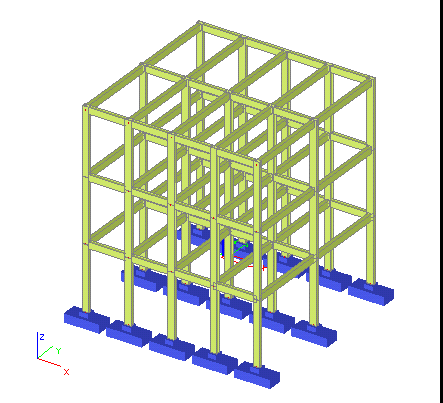
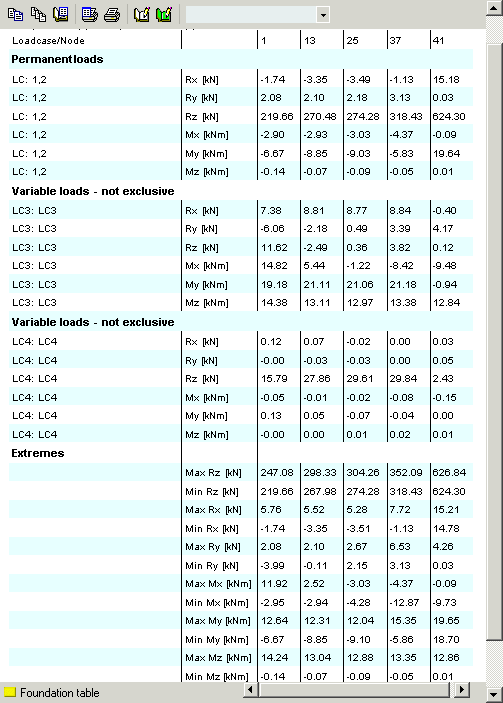
How are results in Foundation table calculated?
The extreme values are calculated as a combination of load cases. It takes into account properties of load groups.
Load cases for extreme calculation (min and max value):
- Permanent load cases are always added.
- Exclusive load cases are added only separately to get the biggest min or max value.
- Seismic load cases can be added as positive or negative to get the biggest min or max value.
Example:
Permanent load cases - LC1=-10;
Variable (not exclusive) - LCV1=-3;
Variable (exclusive) - LCVE1=5, LCVE2=-5;
Extreme MaxRx = LC1+LC2+LCVE1 = -10+5 = -5;
Extreme MinRx = LC1 + LCV -+LCVE2 = -10-3-5 = -18;