
Tools - filtering row
Property filter
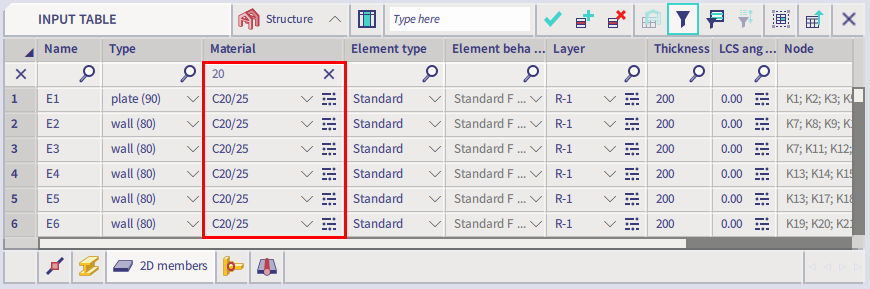
Values can be filtered by any property in the table. The filter is launched by the toolbar icon Filter bar in table.
The filter row is displayed as a first row of the grid. Each cell is marked by a magnifying glass icon.

The filter cell works with a part of the value / string or with the whole value / string, for example by searching "p" or "plate" in the image below:


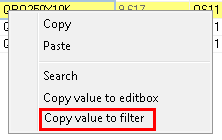
Use value from table in the property filter
There is a item in the context menu on the cell:
Filter on color or boolean values
The user can filter on color by typing the name of the color.

It's also possible to filter on boolean values (as used for checkboxes / toggles), by using "1" (= true, toggle activated) or "0" (= false, toggle not activated).

When the filter stayed
The tab will remember its filters during:
- moving;
- switching to another tab;
- hiding the tab;
- displaying the tab.
The filter will be cancelled when the property is removed from the grid.
More filters together
One of more filter cells may be used together. The filter is saved during sorting, removing column or switching to another tab.

Cancel the filter
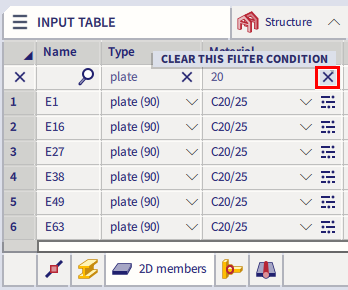
The filter for one column is cancelled by the x button in that column.
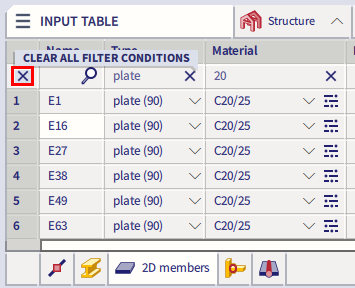
All filters may be cancelled by the x button in the row header.
Filter conditions
When you hover with the cursor over a filter field, a tooltip menu appears which explains the filtering possibilities.

Simple comparison: the table displays only rows which have in the selected column a value which contains the value entered in the filtering row.
"=" and "<>": the table displays only rows which have in the selected column value equal or not equal to the specified value.
"<", "<=", ">" and ">=" for numerical values: the table displays only rows which have in the selected column value less than, less than or equal, greater than or greater than or equal to the specified value.
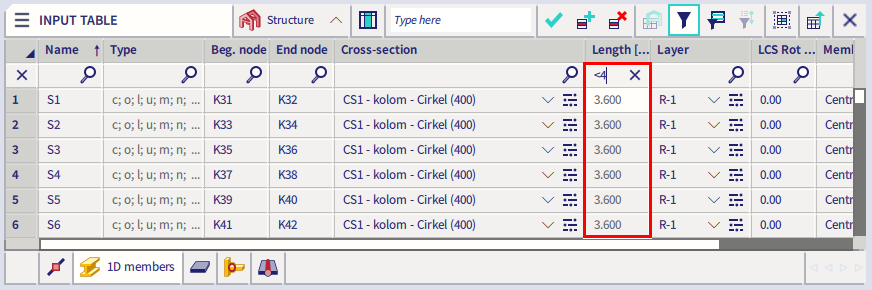
"<", "<=", ">" and ">=" for text values: the table displays only rows which have in the selected column value less than, less than or equal, greater than or greater than or equal to the specified string value. The advanced logic can also handle the naming system often used in civil engineering (e.g. naming of columns - first symbol (letter) according to x line-grid axis, the second symbol (number) according to y line-grid axis).

Filter by open interval "(XXX;YYY)": the table displays only rows that have in the selected column value greater than XXX and less than YYY, where XXX and YYY can be a numerical or string value.

Filter by closed interval "<XXX;YYY>": the table displays only rows that have in the selected column value greater or equal to XXX and less than or equal to YYY, where XXX and YYY can be a numerical or string value. The sorting by closed interval is best to be used for discrete and round values, such as names of entities various member properties or coordinates.
