
Open checks: Configuration file > Result variables
On sheet Result variables is defined all settings for variables.
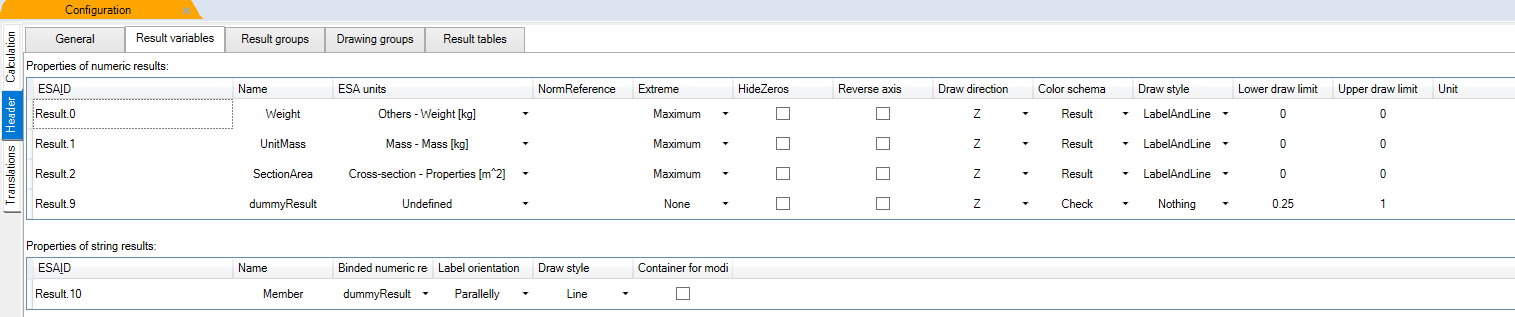
Results are presented in ascending order with smallest Result.ID on top.
Settings for double type results
ESAID
Internal result ID. Used for linking results with customised result tables. If more results should be presented in one column in Brief table, than result with lesser ID is presented more top and result with higher ID is presented below.
“Result.X”: string, where X is a place-holder for whole number. Any whole number is allowed. Usually starts with 0
Name
Name of variable. Defined on sheet Calculation in Script editor or in Table of variables. Visible in SCIA Engineer in command properties, where value for drawing is selected.
ESA unit
Define what unit is used for value in SCIA Engineer. In SCIA Engineer is possible to use few hundred units. See Setup – Units in SCIA Engineer. Defining proper unit id here is vital to proper linking result with SCIA Engineer. Without unit is result presented as unitless value. With proper unit, it reacts on unit setting in SCIA Engineer, like unit symbol, decimal length and output format.
Extreme
Define what extremes are found and presented. It works together with Extreme setting in SCIA Engineer. Each extreme means one additional row in Brief table. Unless some extremes are in same section. In this case are result grouped into one row.
- Maximum – Only maximum value is presented. Example: Unity check
- Minimum – Only minimum value is presented. Example: stress in compressed concrete (because negative is pressure)
- Both – Both extremes are presented.
- None – No extreme is used. This is usable for additional values which are only in Brief table, but not drawn. Extremes are not needed for these values.
Hide zeros
Define if zero value is presented or excluded from presentation in both 3D scene and Brief table. It affects extreme finder. Like if zero is extreme or if some other non-zero extreme is found.
- Show – Zeros are used and presented
- Hide – Zeros are hidden
Reverse axis
Define if drawing result value is in opposite direction to selected axis.
- Not reverted - Positive value in positive axis direction
- Reverted - Positive value in negative axis direction
Draw direction
Define in what direction is result presented. Directions are related to coordinate system setting (Principal or Member).
- X – Result is drawn in X direction of the member
- Y – Result is drawn in Y direction of the member
- Z – Result is drawn in Z direction of the member
Color schema
Define in what colour style is result presented.
- Check – Result is drawn in Green/Red/Grey colour style (OK/Not OK/Not used)
- Result – Result is drawn in Blue/Red/Grey colour style (Above max/Below min/In between min and max)
Draw style
Style of drawn results.
- LabelAndLine – Result is drawn in both label with calculated value and line in 3D scene
- Label – Result is drawn only as a description in 3D scene without line
- Line – Result is drawn only as a line in 3D scene without description
- Nothing – Result is not drawn in 3D scene. Results only for Brief/Result table should have this setting. Result is not available for drawing and is visible only in Brief/Result table.
Lower draw limit
Define the minimal limit value for drawing. Value below limit is drawn as Not used/Below min. Value above limit is drawn OK/In between.
Upper draw limit
Define the maximal limit value for drawing. Value above limit is drawn as Not OK/Above max. Value below limit is drawn OK/In between.
Additional settings for string type results
Binded numeric result
Special setting for string type result. It defines master numerical result. SCIA Engineer shows in 3D scene numerical result and this is used if some string should be presented instead of number. Like for concrete, number of bars and diameter instead of reinforcement area.
Label orientation
Special setting for string type result. For string type result is possible to define in what direction it should be presented. Use 0 for numerical result.
- SEN_Standard – Standard setting from SCIA Engineer is used. By default, perpendicular to member axis X. Label orientation react on setting in SCIA Engineer properties with this setting.
- Parallely – Result is drawn parallel to member axis X and cannot be changed from SCIA Engineer. Usable for string result which describe some general value which is same on whole member.
Container for modification
Setting for string type result. Define if result is used as place-holder for modifications in SCIA Engineer. Use false for numerical results. If true, than value is used by another internal SCIA Engineer calculation to do some action according it. Using of this needs cooperation with SCIA Engineer developers to prepare additional functionality for it.
- true: result is used as place-holder for modification
- false: normal string result, not used for modification