
Modal analysis with initial stress
In the field of structural dynamics, modal analysis is typically performed under the assumption of linear structural behaviour (see Natural modes, solution of free vibration). This means that non-linearities, such as material non-linearity or large deformations, are generally not considered in this type of analysis. However, initial stress can be incorporated into modal analysis because it affects the system's effective stiffness and, consequently, its dynamic properties.
The influence of initial stress in a structure can be accounted for by modifying the global stiffness matrix K, which is given by:
 ,
,
where Kmaterial is the standard (material) stiffness and Kgeometric is the geometric stiffness matrix representing the influence of initial stress. This formulation allows for the inclusion of initial stress effects in linear modal analysis, ensuring consistency with the principles of structural dynamics.
In SCIA Engineer, initial stress can be taken from the load case or from non-linearity. If it is required to assume initial stress from non-linearities, the type "Initial stress" or "cable" must be selected. Examples of the implementation of initial stress, including comparisons with the analytical solution and the solution without the effect of initial stress, will be further presented in a simple example.
Example
The effect of initial stress in modal analysis will be further explored using a simply supported beam as an example. In each of the following calculations, the applied force, temperature, and strain were carefully selected to ensure that the normal force in the beam remains consistent in magnitude. To allow direct comparison with analytical results, the "Neglect Shear Force Deformation" option was enabled in the solver. The structure was discretized into 10 finite elements, as illustrated in the following picture:
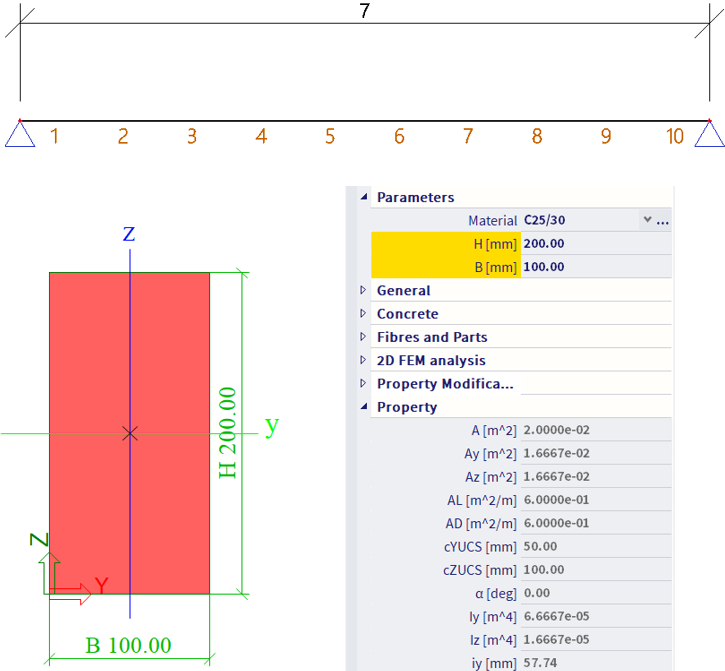
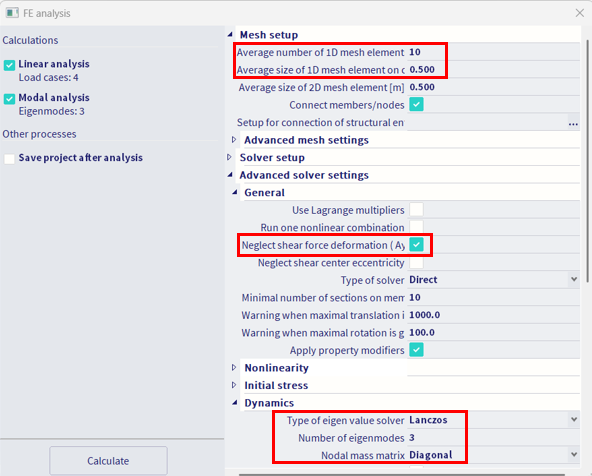
The beam has a length of 7 m and a rectangular cross-section with a height of 200 mm and a width of 100 mm. It is made of concrete C25/30. For the modal analysis, only the self-weight of the structure was considered. In the absence of initial stress, the first bending natural frequency f1 is determined by the following equation:
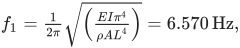
where L is the length of the beam (7 m), E is the modulus of elasticity (31 500 MPa), I is the moment of inertia of the cross-section (6.667×10⁻⁵ m4), ρ is the material density (2500 kg/m3)and A is the cross-sectional area (0.02 m2).. After substituting the values, the result is 6.570 Hz, which is the same value as obtained in SCIA Engineer.

When considering the influence of initial tension (normal force) on the first bending natural frequency f1, the formula must be modified as follows:

where N is the normal internal force (100kN). From the formula, it is clear that if N > 0, resulting in an increase in the natural frequency. Conversely, if N < 0, the natural frequency is expected to decrease. By substituting the values into the formula, the calculated result is 7.305 Hz.
In SCIA Engineer, initial stress can be defined in various ways to suit different modelling needs. Let’s take a look at a few examples of how initial stress can be applied within the software.
Initial stress from: Nonlinearity 1D – Initial Stress
To apply nonlinearity to a 1D member, you must first activate the "Nonlinearity" option in the "Functionality" tab of the “Project Data” dialog.

The initial stress can then be directly applied using the "Nonlinearity 1D" (see Initial stress), which is available in the Input panel under Boundary conditions. The value for "Normal Force [kN]" should be set to match the value used in the analytical calculations.

Before running the analysis, ensure that the “Initial Stress” option is activated in the “FE Analysis” dialog, within the “Initial Stress” section. Then, enable the “Stress from Member Nonlinearity Data” option. The modal analysis results will clearly reflect the inclusion of the initial stress, and the outcomes will be identical to those obtained from the analytical solution.

Initial stress from: Nonlinearity 1D – Cable
Similarly to the previous case, the “Nonlinearity” must first be activated in the “Project Data” dialog. Additionally, the “Cables” functionality must also be enabled.

In this example, the “Normal Force” in the cable nonlinearity was set to 100 kN, while the “Self Weight” option was deactivated. This was done to preserve the geometry, as enabling the “Self Weight” would cause a sag in the cable, making it impossible to compare the results with the analytical ones due to a difference in geometry (see Cable).

When the project includes cable-type nonlinearity, the “Initial Stress” and “Stress from Member Nonlinearity Data” options are automatically activated in the “FE Analysis” dialog. The analysis results show that they match the analytical solution perfectly.

Initial stress from: Load Case – Force
The setup is straightforward. First, create a new load case and apply a “Point Load in Node” with a value of 100 kN to one of the boundary nodes. Additionally, change the support from a hinged to a sliding support to generate a normal force of 100 kN in the beam.

Before running the analysis, ensure that the “Initial Stress” option is activated in the “FE Analysis” dialog. Then, select the appropriate load case next to the “Stress from Load Case” option. The results will once again match the analytical solution perfectly.

Initial stress from: Load Case – Temperature load
The temperature change was calculated to induce a normal internal force of 100 kN. This value was determined based on the material's thermal expansion coefficient, α = 1×10⁻⁵ m/m·K, and a temperature change Delta of -15.873 K. This result was applied as a “Temperature Load on 1D” across the entire length of the beam. Both supports were assumed to be hinged.

Before running the analysis, ensure that the “Initial Stress” option is activated in the “FE Analysis” dialog. Then, select the appropriate load case next to the “Stress from Load Case” option. The results will once again match the analytical solution perfectly.

Initial stress from: Load Case – Longitudinal strain on 1D
The longitudinal strain was calculated to induce a normal internal force of 100 kN. The corresponding strain value of -0.15873 mm/m was applied as “Longitudinal Strain on 1D” across the entire length of the beam. Both supports in this case were assumed to be hinged.

Before running the analysis, ensure that the “Initial Stress” option is activated in the “FE Analysis” dialog. Then, select the appropriate load case next to the “Stress from Load Case” option. The results will once again match the analytical solution perfectly
