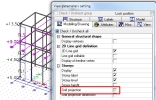
Storey view parameters
The view parameters for storeys are on the tab Modelling/Drawing.
The storeys displays:
- Storey label – name of the storey level
- Storey level – the value from Z-bottom column in the storey manager
- Storey height – the value h_fl in the storey manager
- Grid projection – if the 2D linegrid should be projected to the storey level (grid with labels)
- Grid projection dimension – if the 2D linegrid should be projected also with dimensions, this option can be used only when “Grid projection” is switched on, otherwise it is not visible in the project

The view parameters for selected entities can be used for storeys as well. If the user wants to project the linegrid only in some storey levels, then he has to select them in the model and use view parameters for selected.
Example:
- User wants to display linegrid on the FL3.
- He select the storey level FL3 in the model and start view parameters for selected
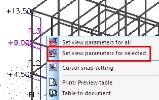

- He selects the grid projection in the dialogue.
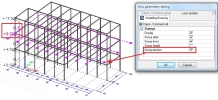

- The gray checkbox is displayed in the view parameters for all. That’s because it is checked only for the selected part of the model. It can be changed by un-checking it.