
Detailed results for seismic spectral analysis
Since SCIA Engineer v 25, there is a results command that provides detailed results for seismic spectral analysis. This command is called Dynamics detailed. It is accessible via "Results → Dynamics → Dynamics detailed", or by default also from the "Process toolbar" in the "Results section".
Seismic spectral detailed results are accessible if there is at least one seismic load case calculated in the project. To display these results, first set "Type of load" to "Load cases", then select the corresponding seismic load case in the "Load case".
Dynamics detailed - seismic load case
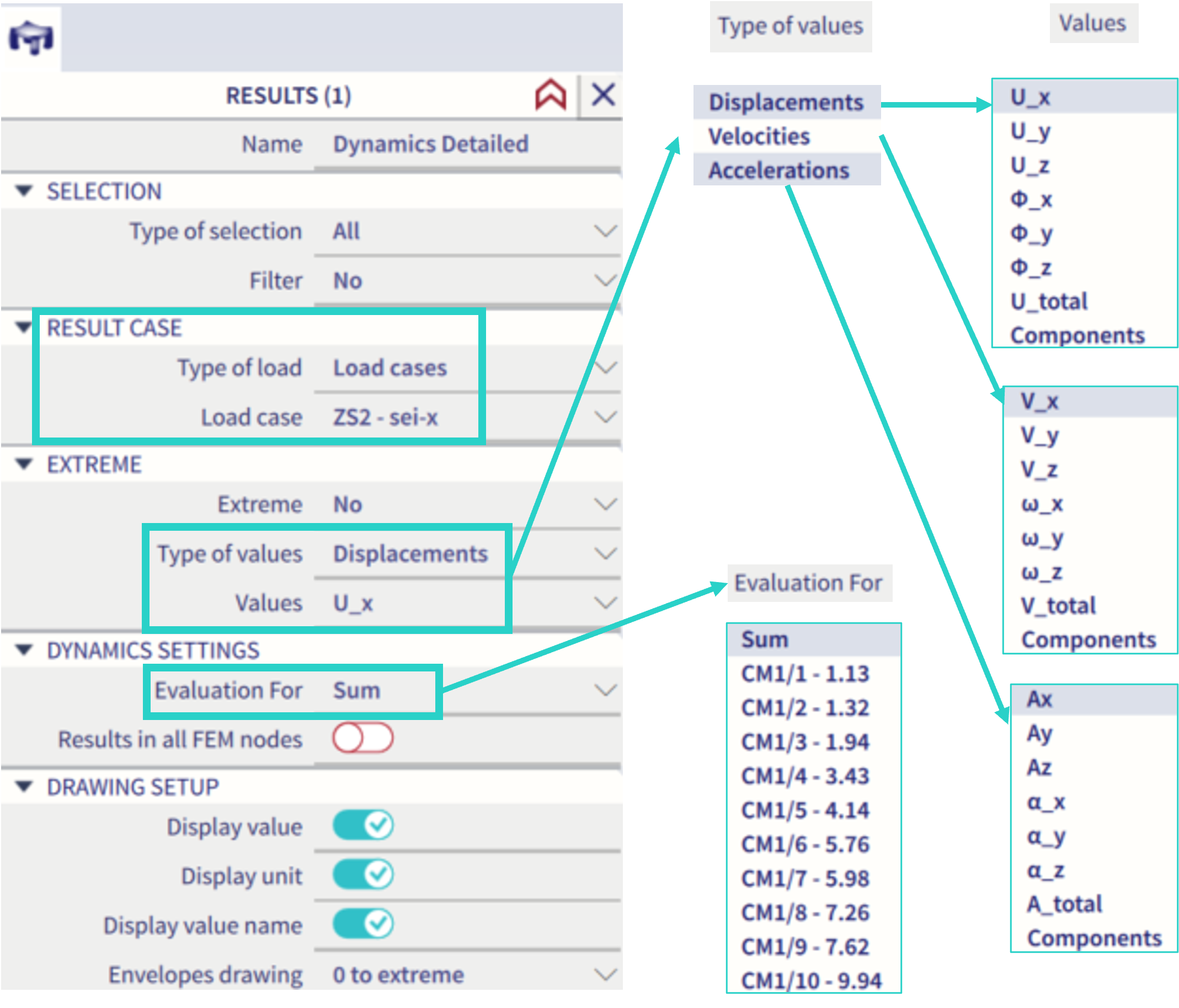
For seismic load case results, the "type of values" might be selected as "displacement", "velocities" and "accelerations". For each type of value, the corresponding values of translational and rotational motion might be selected, as well as the total value (the vector sum) and more components (multiple values to be displayed at once). See in the figure below.
The "Evaluation for" property might be set to "sum" - in this case the values based on all the eigenmodes are summarized in accordance with the selected summation rule of the corresponding seismic load case (the "type of superposition" property, which might be set to "SRSS" or "CQC" within the corresponding load case properties). Alternatively, the results might be evaluated only for single selected eigenmode of the corresponding modal analysis (see example in the figure below - in this case only 10 eigenmodes have been calculated, which will not be sufficient for most of the structures).
The check box property "Result in all FEM nodes" offers to plot the result in all the nodes of the finite element mesh (example provided in the figure below). If the mesh is fine, this might be graphically in 3D scene rather unreadable. However, the export into excel sheet from the "result table" might have some practical application in order to see the results in all the mesh nodes.

Units
In order to change the units of accelerations or velocities: "Unit system" → "Manage units" → "Dynamics" → and the corresponding entities - see the figure below:
